Tour Review options
7094 views
•
Updated 20 hours ago
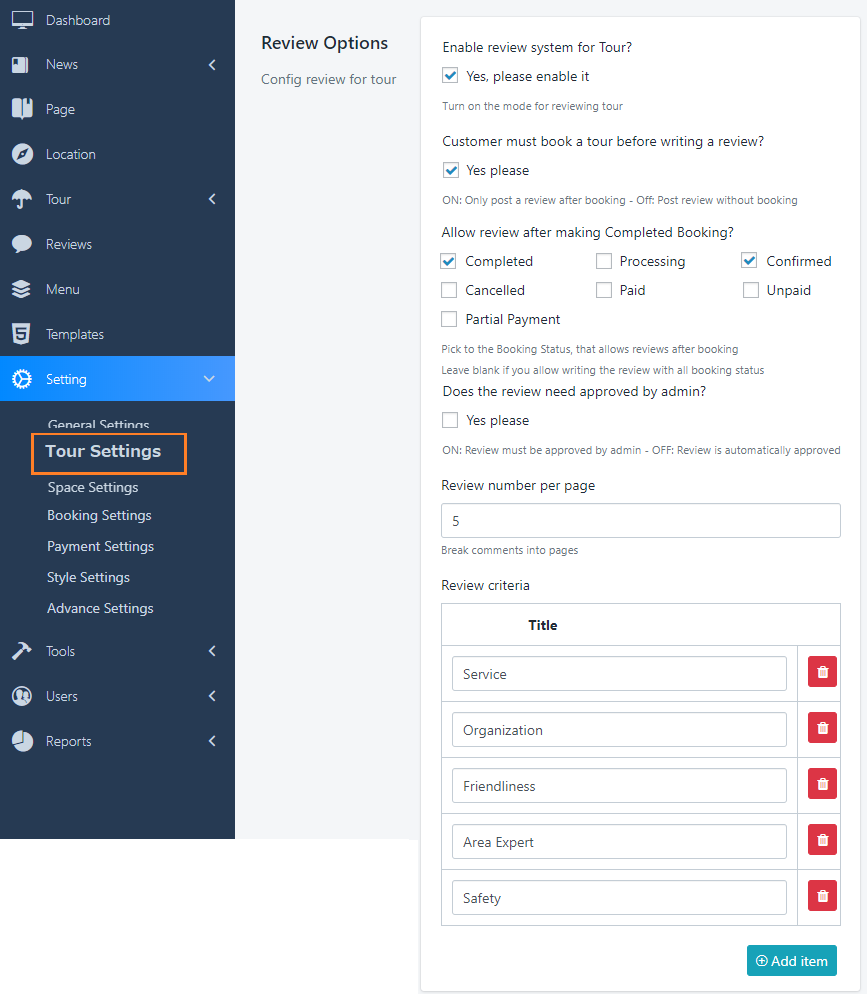
Each module has a setting for Review, similar features can be found in the remaining modules, try to find out with Tour review options:
Go to Dashboard > Settings > Tour Settings
- Enable review system for Tour: Allow you to turn ON/OFF the review form for Tour
- Customers must book a tour before writing a review: tick on this option if you want to restrict the spam comments
- Review approved: Tick the box to REQUIRE admin's approving the Review before the Public
- Review number per page: Break comments into pages
- Enable review: You can also create other evaluation criteria for your Tour by clicking the button Add new or red trash icon on the right top of each option.
Was this article helpful?