3. Create Room for Hotel
8378 views
•
Updated 10 seconds ago
3. Create Room for Hotel
Navigate to Dashboard > Hotel > Edit Hotel, then Add some information like Name, Featured Image, Price, number of Room, the acreage, Max person(Adult/Child) for room...
- Title: Enter the room name corresponding to the room type
- Featured image: Upload image to set the Featured image show in list Room of Hotel
- Price: input the price of this room per day
- Number of Room: input the Number of this type's room is available
- Number of Bed: input the number bed of Room
- Max Adult and Children: input the Max number of person allowed in Room(Max Adults and Children)

Attribute for Room
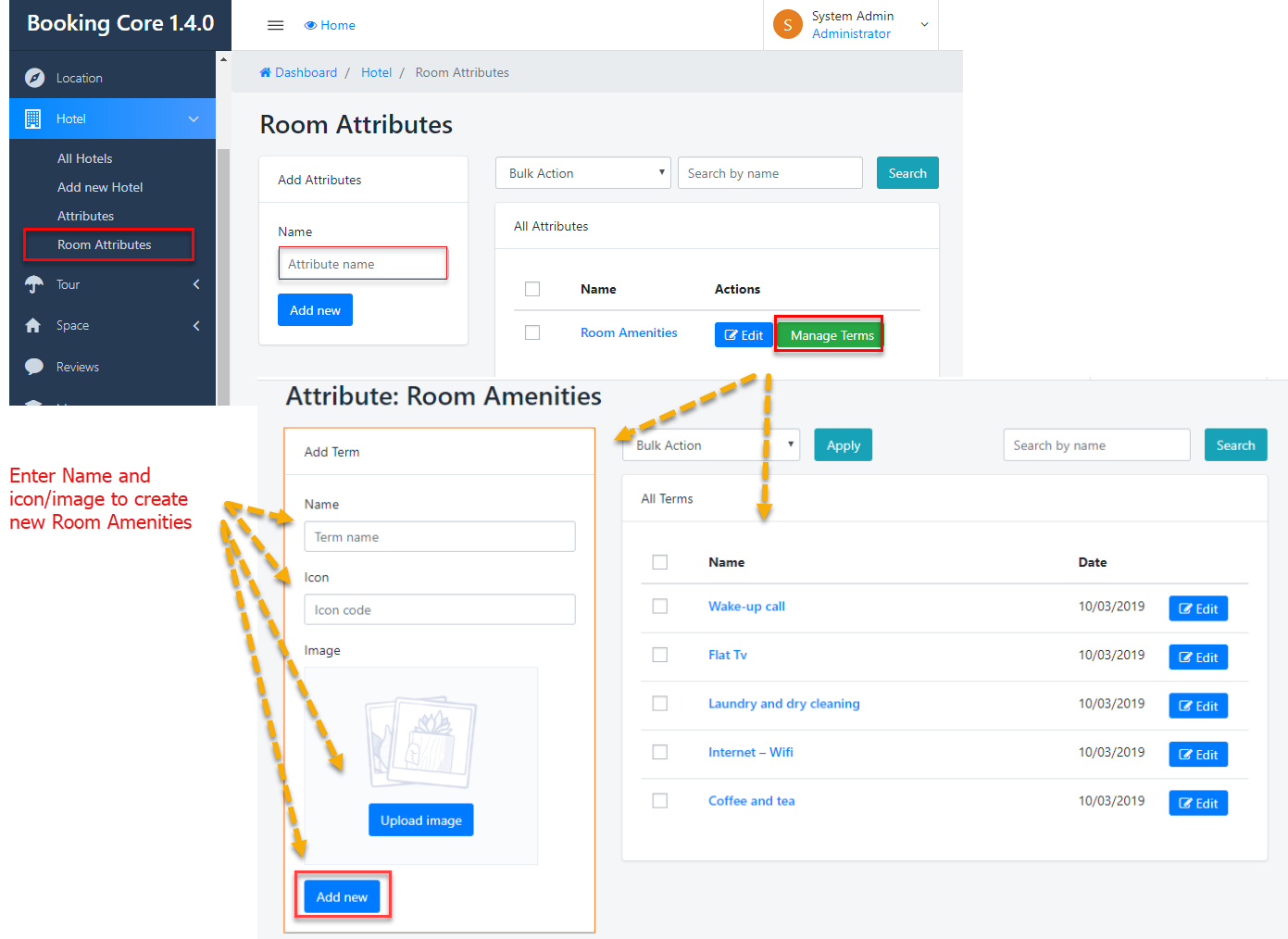
Navigate to Dashboard > Hotel > Room Attributes to see Panel manage. And just need to enter Name of Attributes => press to Add New button, new Attribute will be created
The next step is to input the Room Amenities, Press to Manage Term to Open List Amenities
Was this article helpful?